Eight palettes.
One click away.
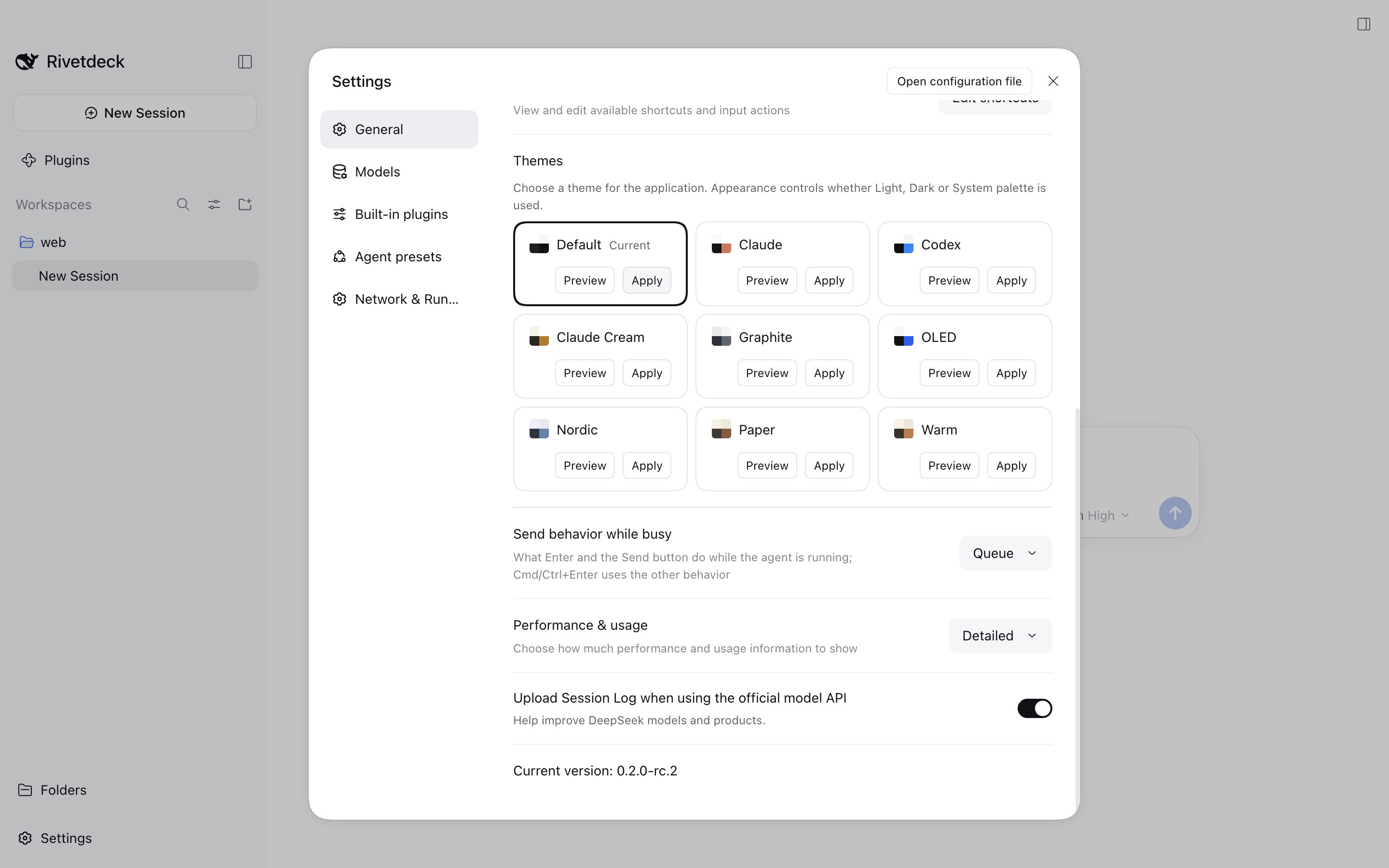
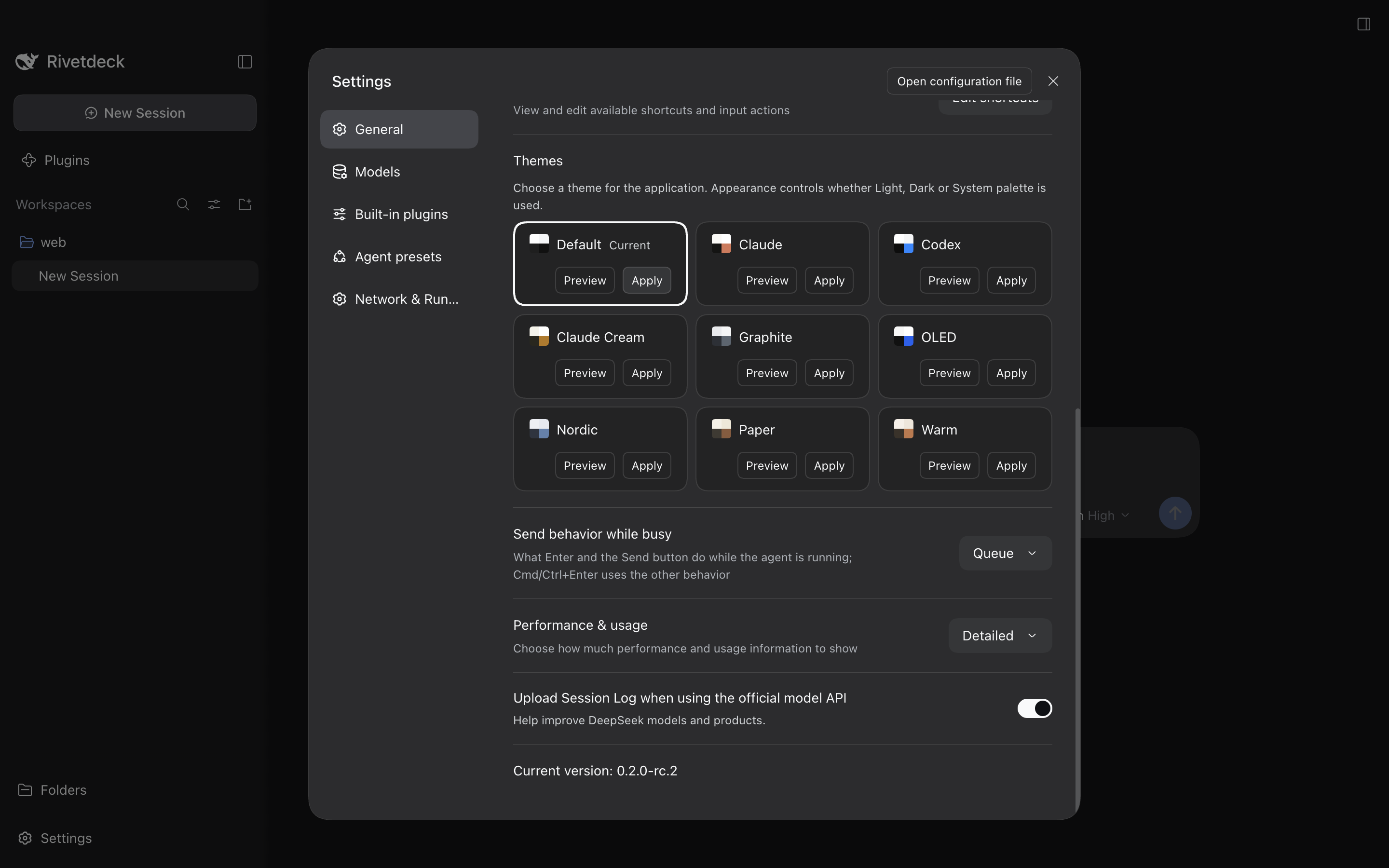
DSH ships light, dark and follow-system. Theme Studio adds a Themes row to Settings → General with eight built-in palettes — hover to preview, click to apply, Default to give every color back.
- Every theme ships light and dark values
- Preview is transient; nothing persists until you click
- Preinstalled in Rivetdeck
Eight built-in palettes
Every theme ships both modes
Claude, Codex, Claude Cream, Graphite, OLED, Nordic, Paper and Warm — each carries light and dark token values that follow the official Appearance resolution. Try them here; the values come straight from the plugin’s presets.
Nordic — Cool blue-gray with a cyan-blue accent. Rendered from the palette values in Theme Studio 0.1.3. Illustrative layout, not a screenshot.
The four-color mosaic in the selector always shows the light sample — it is a palette swatch, not a mode indicator.
The Themes row
Between Appearance and Font size
The row lands in Settings → General styled like the official Language row: a dropdown selector carrying the applied theme’s four-color mosaic and name.
- The menu lists Default plus the eight built-in palettes, each with its swatch
- The row and its menu follow the interface language
- With no theme chosen, the settings page is item-for-item identical to an uninstalled harness
- AppearanceSystem
- ThemesNordic
- Font size13
Preview, then apply
Hover is temporary. Click is persisted.
Hovering a menu item applies its colors temporarily; closing the menu — pointer leave, outside click, Esc or toggling the selector — restores the previous state. Only a click or Enter asks the Host to save, and the choice survives restarts and new sessions.
- Preview never writes: hovering mutates no setting
- Default clears every overlay and saves activeThemeId=null
- When the Host refuses to save, the row reports it and restores the last accepted choice
Theme menu states
- Graphiteapplied & saved
- Nordichover — previewing
- Defaultclears every overlay
Boundaries
The official Appearance stays in charge
Theme Studio is deliberately narrow: it widens the palette, not the settings model.
- 1
Mode stays upstream
Light, dark and follow-system remain the official Appearance’s job; every palette ships both variants so mode resolution is unchanged.
- 2
Fonts stay upstream
Font family and size are official settings — previewing, applying, cancelling and Default never rewrite them.
- 3
Tokens only
The plugin emits overrideTokens; the accepted snapshot and the DOM rendering belong to ctx.theme.
- 4
Portable by construction
Declared platform:web — no Electron imports, no Node client capabilities, no Desktop provider, no model tools or prompt content.
What this does not claim
- Only the eight built-ins: custom .dsh-theme.json import/export and a theme editor are roadmap items, not features.
- The contrast check is a diagnostic, not a gate — some palettes fall below threshold and are neither repaired nor blocked.
- Preview is hover-driven: keyboard focus does not preview; press Enter to apply.
- The read-only catalog ctx.themeStudio.catalog exists only on the Client — no dynamic registration and no Host RPC.
Getting started
Two commands, then pick a color.
The plugin installs through the DSH plugin manager from four sources — and in Rivetdeck it is already preinstalled, so there is nothing to do.
- 1
Install the package
Run this with a supported DSH runtime. Replace the profile for Electron desktop.
Recommended. Pre-built artifact; no package code runs at install time.
install · npm $ dsh plugin --profile web add @dsh-electron/dsh-theme-studio$ dsh --profile webPre-built offline package; the release asset is named plugin.tgz.
install · tarball $ pnpm pack @dsh-electron/dsh-theme-studio$ dsh plugin --profile web add ./dsh-electron-dsh-theme-studio-0.1.4.tgzBuilds from source on install through prepare; allowBuilds must name this package — pin a tag.
install · github $ dsh plugin --profile web add github:cherrchen/dsh-theme-studio#v0.1.4Links a local checkout for development; no allowBuilds needed.
install · local $ git clone https://github.com/cherrchen/dsh-theme-studio.git$ cd dsh-theme-studio$ pnpm install --frozen-lockfile$ pnpm build$ dsh plugin --profile web add "$PWD" - 2
Approve the GitHub build step
Only a
github:install builds on your machine — the package’s ownprepare. When pnpm stops withERR_PNPM_IGNORED_BUILDS, add the package itself to that profile’spnpm-workspace.yaml, then run the add again; pin a tag so a later push cannot change what runs.pnpm-workspace.yaml allowBuilds: '@dsh-electron/dsh-theme-studio': true - 3
Open Settings → General
The Themes row sits between the official Appearance and Font size rows.
Click the selector, hover to preview, click to apply — or pick Default to give every overlay back.
Notes
- Rivetdeck preinstalls Theme Studio; the bundled version can lag the npm release. Install into the profile to run a newer one.
- Commands above use the web profile. For Electron desktop, replace
--profile webwith--profile desktop. - Running DSH from a source checkout? Use
pnpm dshinstead ofdsh.
Compatibility
An exact list, not a range.
Settings services and menu icons change shape across pre-stable releases, so the allowlist in the plugin is the only support claim — every row below ships in the published v0.1.4 package.
| DSH release | Status | Added in | Notes |
|---|---|---|---|
| 0.1.5-rc.2 | Verified | v0.1.0 | Baseline of the allowlist. |
| 0.1.5-rc.3 | Verified | v0.1.0 | Manifest-only re-release; same settings shapes as rc.2. |
| 0.1.6-alpha.1 | Verified | v0.1.0 | Legacy settings register path. |
| 0.1.6-alpha.2 | Verified | v0.1.0 | Same settings shapes as alpha.1 for this plugin. |
| 0.1.7-alpha.1 | Verified | v0.1.0 | Config / configure / configForms replace register / settingsScope. |
| 0.1.7-alpha.2 | Verified | v0.1.0 | Same shapes as alpha.1. |
| 0.1.7-rc.1 | Verified | v0.1.1 | Install starts enforcing the exact peerDependencies list. |
| 0.1.7-rc.2 | Verified | v0.1.1 | Same shapes as rc.1. |
| 0.2.0-rc.1 | Verified | v0.1.3 | DSH 0.2 release candidate; eight new semantic tokens audited. |
| 0.2.0-rc.2 | Verified | v0.1.3 | Same shapes as rc.1 for this plugin. |
| 0.2.1-alpha.1 | Verified | v0.1.4 | Font families and sizes stay host-owned alongside overlays. |
| 0.2.1-alpha.2 | Verified | v0.1.4 | Development pin of the plugin. |
| Any other release | Unsupported | — | Unverified rather than refused: the plugin does not gate at runtime; install-time peer ranges may still reject it. |
The plugin does not gate itself at runtime: an unlisted release is simply unverified, and a mixed install can still start. Peer admission at install time may refuse some mismatches. Evidence and adaptation seams live in the compatibility matrix (opens in a new tab).
Give the window your palette.
One command to install — and in Rivetdeck it is already there. Pick Default and every overlay is gone.